DOM XSS in jQuery selector sink using a hashchange event | Apprentice
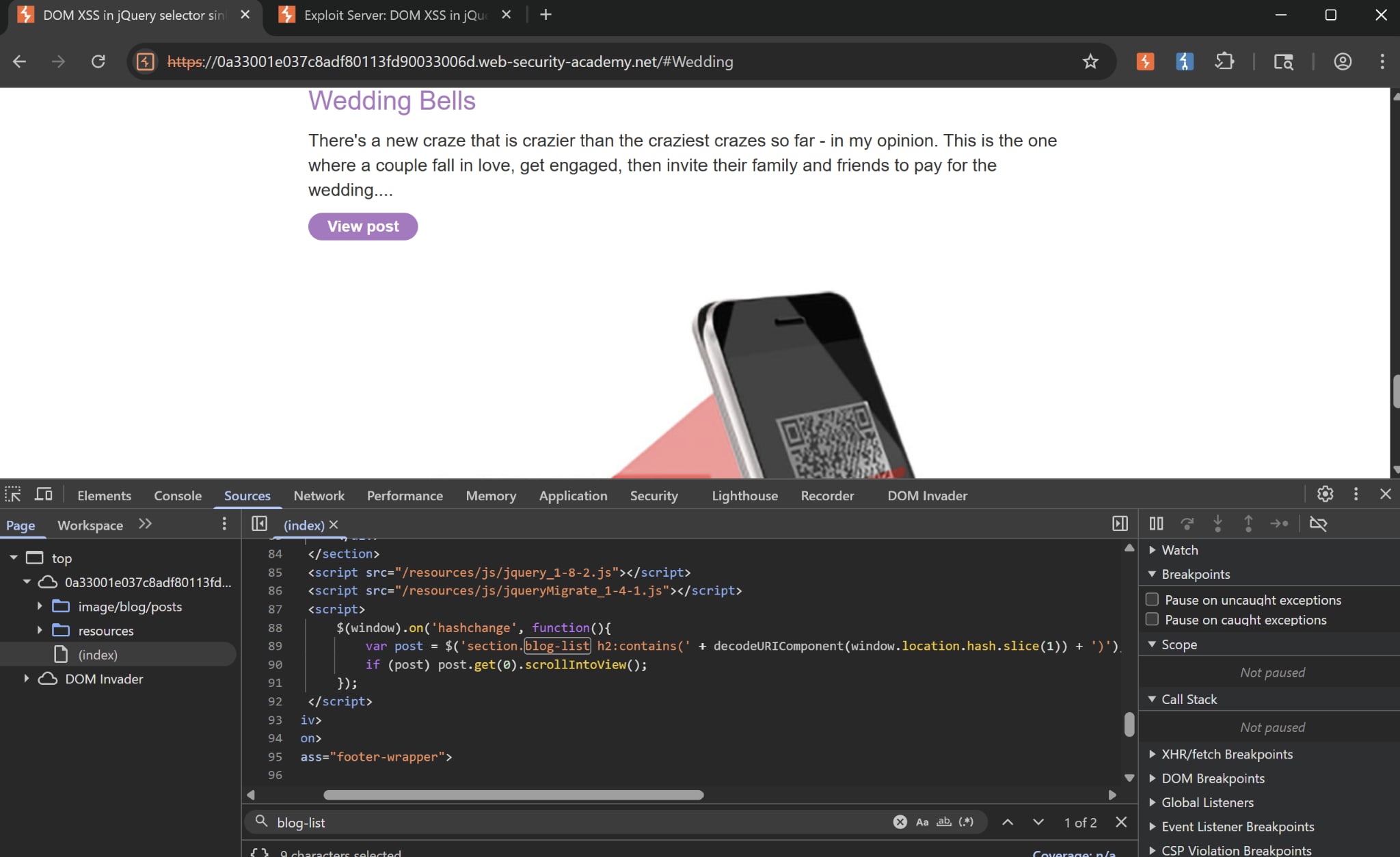 Once we check the source for our homepage, we see that there is a peculiar JS code snippet. It is a
 $() selector sink that picks up whatever inside window.location.hash, then try to find an h2 element under the blog-list class containing that value.
If value is found, then it scrolls down to that. Here in our example is an h2 tag being scrolled down to, notice #Wedding in the URL. One notable thing is that the backend doesn’t filter elements such as <, >, or HTML tags such as script, img. We can try this by inserting those into the hash and view the response.
I first tried to insert <img src=x onerror=print()> as my payload, but I didn’t realise that the hash only triggers if it’s a hashchange event, which means the hash has to change.
To do this, there is another payload:
<iframe src="https://<lab-id>.web-security-academy.net/#" onload="this.src+='<img src=x onerror=print()>'"></iframe>
This first set the hash to be empty initially. Once it’s loaded, the hash will become our payload, thus triggering the hashchange event.
Though jQuery is less common now, this lab helps strengthen our pentesting intuition which is always to look out for subtle details like this.